
Modern compilers offer in general very good optimisations using code transformations that attempt to reduce the number of instructions and to maximise the computational throughput (i.e. number of operation per CPU clock step). The user guides of each compiler installed on HECToR , Ref [1], present detailed information on this subject, here we present just a short summary.
The available optimisations can be classified broadly as follows:
Not all optimisation transformations always lead to faster code but each compiler has a set of generic optimisation flags that improve performance significantly in almost all cases. These generic flags are combinations of low level switches that can be adapted further for a specific application. Two more kinds of flags are useful during optimisation process: (i) the documentation flags that can be used to ask a compiler for more information about optimisation flags and (ii) the info flags that provide information on the success or failure of attempted optimisation on the source code.
Below we describe briefly for each compiler the generic optimisation flags together with the descriptive and info flags. User guides and man pages must be studied for complete and up to date information.
For many complex scientific applications performance varies significantly for executable binaries generated with different compilers. Information about the best suited compiler for a given application can be found from the user community but it is good practice to test this information as architectures and compilers evolve at a relatively high pace on HPC systems.
The HECToR website provides a compiler performance comparison page for a set of applications used on HECToR which contains also examples of optimisation flags combination used for the respective applications. The results show that performance can be increased up to 20% just by selecting the right compiler with the right combination of flags.
Before concluding this section is worth mentioning that the optimisation level might need to be decreased for files on which compilation crashes, or if the application crashes or produces incorrect results. To test the numerical accuracy between two architectures, non-optimised executables should be used if possible.
Using libraries for standard numerical operations avoids programming errors and conserves code performance across platforms. Ideally all numerical intensive task should be delegate to libraries leading to a code layout similar to Fig 1.
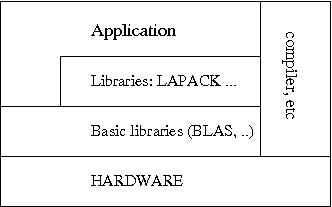
Fig. 1: Layers of library calls ensure portable numerical performance.
	  DO I = 1, N
	  Y(I) = 0.0D0
	  DO J = 1, M
	  Y(I) = Y(I) + 2.0D0*A(J,I)*X(J)
	  END DO
	  END DO
is equivalent to a BLAS call
CALL DGEMV('T',M,N,2.0D0,A,LDA,X,1,0.0D0,Y,1)
On HECToR several suites of libraries are available, Cray's Lib Sci is the
default library; ACML and NAG libraries are also installed on
HECToR (accessible via module environment). They provide the
standard linear algebra packages (BLAS, LAPACK), fast Fourier
transform, random number generators and much more. Up to date
information on components and versions of each library can be
found in
the
User Guide and man pages.
If the code spends a significant amount of time in some
library routines it is good practice to check if the selected
vendor and version of the library is the one best suited for the
application. As mentioned above, user or developer community
wisdom
is the way to avoid blind search.
For the remainder of this guide we focus on some of the core optimisation techniques for numerically intensive codes. In general two main factors determine the speed of a computation: (i) the algorithm efficiency, i.e. the number of steps it needs to complete a computation for a given input, and (ii) how well the executable exploits processor architecture.
Accordingly, the first step for a fast implementation is to select the best algorithm considering the constrains and the range of values for the parameters defining the problem. As scientific applications tend to be applied to larger problems in time (large in the sense of number of particles, grid points, etc.) it is very important to use algorithms that have good scaling properties for the parameters of interest. On the other hand the programmer should not overkill the problem. Complicated algorithms are harder to maintain and error prone. Even if a new algorithm is asymptotically faster one has to check if the operating regime of interest is included in the domain of parameters in which the new algorithm performs better (e.g. there are algorithms which asymptotically are faster but they don't bring any benefit in the intermediate regime).
The second step is to write the source code in a way that makes efficient use of processor capabilities. A short technical digression is useful here in order to make clear why certain code patterns are desirable for performance.
Modern processors have two main hardware features designed for parallel processing of large amounts of floating point instruction and data:
The architecture details of the processor used on phase 3 of HECToR and its peak performance are presented in this document .
The programmer should try to use constructs that expose the
instruction-level parallelism to the compiler but avoiding heavy
code containing
simple optimisations that a modern compiler can do, see Ref
[2].
In numerically intensive
kernels the following rules help optimisation in general:
Although HECToR's processor can perform more than one floating point operation per clock step with data from registers the access time to main memory is of the order of hundreds of clock steps. The technological solution for this disparity is to use a hierarchy of smaller cache memories that have shorter access times. In the current configuration HECToR processors have one individual cache level per core, a second level shared by two cores (the so-called module) and a third level shared across 8 cores (the so-called die). The cache helps because if a memory address is used by the processor at a given instant there is in general a high probability to use the address again, or one in its close vicinity, after a short time interval. Therefore, performance can be improved further by seeking actively to access the memory in local patterns which allows use of the data already in cache as many times as possible.
There are two types of locality:
A simple example that shows the importance of spatial locality is the order of the nested loops over matrix elements. If the matrix does not fit in first level cache memory the computation is significantly faster if the inner loop goes over the first index in Fortran or over the second index in C, thus accessing neighbouring elements in memory.
We mention briefly two more technical aspects which are important in memory optimisation.
Performance analysis tools are helpful in spotting cache utilisation problems.
Modern programing languages offer dynamic memory allocation which allows for greater code flexibility. However memory allocation/deallocation are time consuming operations and they must be avoided in subroutines or functions that are called frequently. The high-water technique is a way to reduce the need for these expensive calls, see e.g. Ref [2].
If the code is written in C++ a couple of specific points should be considered for optimisation: excessive time spent in object creation and destruction, function call overhead, pointer aliasing. This online book, Ref [5], presents details of C++ optimisation specific issues and also an overview on general aspects of optimisation.
Mastering the intricacies of optimisation techniques needs dedicated
study from books, e.g. Refs
[2, 3, 4],
training courses
and lots of practice. A systematic approach is very useful in this
kind of work because a fair amount of time is typically spent in the
processes with the exploration of the code variants. Before starting
it is very important to estimate the possible performance gain from a
performance analysis which can identify the code sectors
worth an optimisation effort and what sort of optimisation is needed
(e.g. memory access vs computation). During the process each new
version of the code should be compiled with
the info flags switched on and its
performance recorded.
For clarity and debugging it is
advisable to keep at hand the original version of the code.
The main points discussed in this guide are illustrated in Fig 2 which presents the computation speed for a dot product operation on two arrays against their size. The three runs correspond to executables compiled with different set of optimisation flags, of which one includes vectorisation. Notice the speed doubling in single precision with respect to the double precision case at around array size 1000 for the executable compiled with vectorisation flag. This is due to the fact that twice as many operands are packed in the vector registers if single precision data are used. The cache effect are visible as steps in performance as the size of the data array increases. Using single precision data allows for larger arrays to be processed faster than compared with their double precision counterpart.
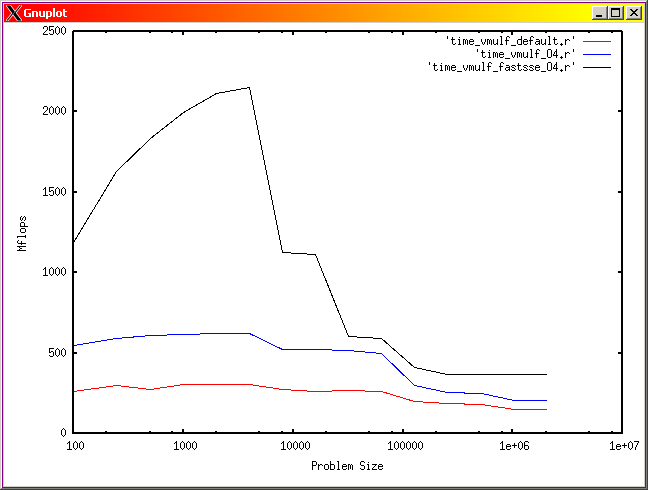
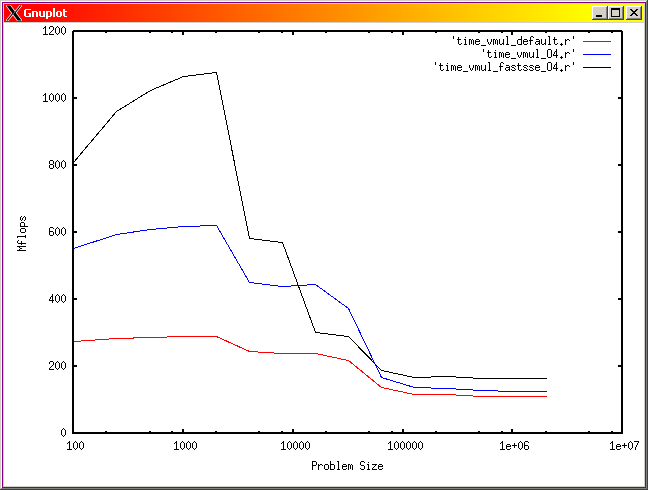
Fig. 2: Computation intensity for a dot product operation function of the array size in single precision (left), and double precision (right). Red line is for an executable compiled with default optimisation, blue is for an executable compiled with -O4 flag and black line correspond to an executable compiled with a vectorisation flag.